
Ali SEO Services HD Image Compressor, Converter & Resizer
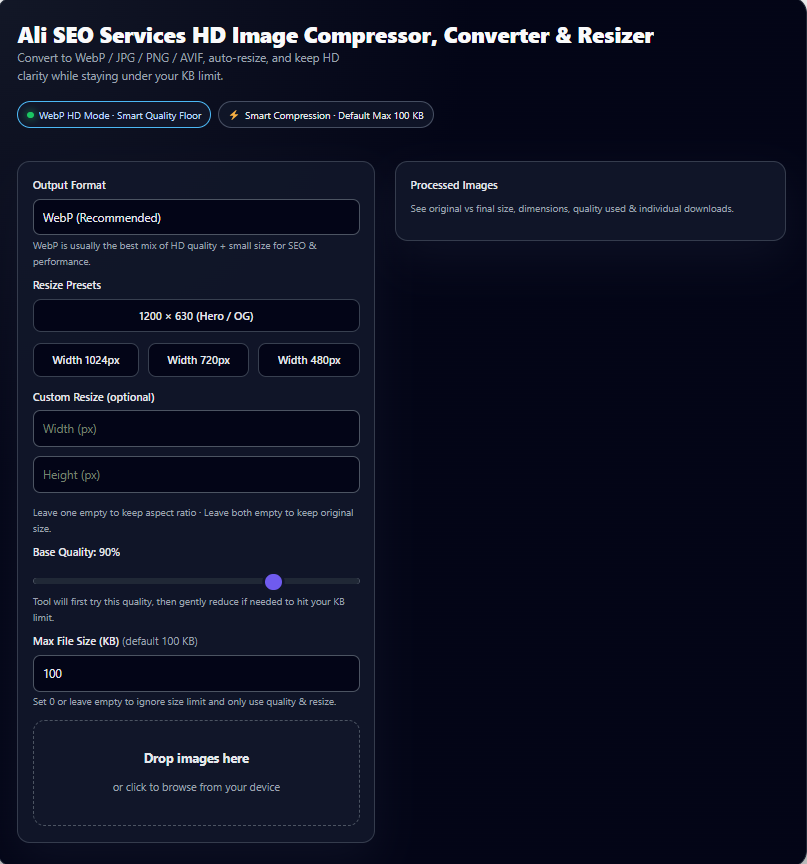
Convert to WebP / JPG / PNG / AVIF, auto-resize, and keep HD clarity while staying under your KB limit.
WebP is usually the best mix of HD quality + small size for SEO & performance.
Leave one empty to keep aspect ratio · Leave both empty to keep original size.
Tool will first try this quality, then gently reduce if needed to hit your KB limit.
Set 0 or leave empty to ignore size limit and only use quality & resize.
See original vs final size, dimensions, quality used & individual downloads.
High-quality images are essential for modern websites—but large files slow down loading speed, hurt Core Web Vitals, and damage SEO. That’s why Ali SEO Services built the Ultimate HD Image Converter & Resizer, a next-generation tool that compresses images under 100 KB while keeping exceptional WebP clarity.
Whether you run a blog, eCommerce store, portfolio, or agency website, this tool gives you HD images at tiny file sizes, optimized for Google, SGE, and fast mobile performance.
Why This Image Compressor Tool Is Different
Most online compressors destroy image clarity.
Our tool uses smart compression logic, HD WebP mode, and intelligent auto-resizing to deliver:
✅ Under 100 KB output
Smart quality + dimension balancing ensures images stay sharp and small.
✅ HD WebP / JPG / PNG / AVIF support
Auto-fallback ensures every browser gets the correct format.
✅ Perfect for SEO & SGE
Fast-loading images boost:
- Core Web Vitals
- Google rankings
- AI Overview visibility
- Mobile performance
✅ Presets for hero images & social previews
1200×630, 1024px, 720px, 480px and custom sizes.
✅ No server upload – everything happens in your browser
Privacy-safe and lightning fast.
How It Helps With SEO & AEO (Answer Engine Optimization)
SGE and AEO prioritize fast, lightweight, optimized content.
Compressed images mean:
- Faster LCP (Largest Contentful Paint)
- Higher page engagement
- Better ranking in AI-generated answers
- Greater crawl efficiency
- Higher user satisfaction scores
Google’s AI systems prefer pages that load fast, especially image-heavy ones.
This tool solves that instantly.
How to Use the Image Converter (Simple Steps)
- Upload or drag & drop your images
- Select output format (WebP recommended)
- Choose a preset size or enter a custom width/height
- Set max size (100 KB recommended)
- Click download—or download all as a ZIP
The tool automatically adjusts dimensions + quality to produce the best possible HD file under your limit.
Who Should Use This Tool?
Perfect for:
- Bloggers
- SEO specialists
- eCommerce owners
- WordPress & Shopify stores
- Designers & photographers
- Agencies optimizing client websites
- Anyone needing fast-loading HD images
Try the Ultimate HD Image Converter Now
Experience professional-grade compression, built for 2026 performance standards.
👉 Faster pages
👉 Better rankings
👉 Stunning image clarity
👉 Lighter media library
Transform your website speed in seconds—your users and Google will thank you.
Top FAQs for the HD Image Converter & Resizer (Under 100 KB Tool)
1. How do I compress an image under 100 KB without losing quality?
You can compress an image under 100 KB by using a tool that balances smart quality control, WebP compression, and automatic dimension adjustment.
Our HD Image Converter analyzes your image and applies the best combination to deliver crisp, high-quality output under your selected size limit.
2. Does compressing an image reduce quality?
Not always.
This tool uses HD WebP mode and smart scaling to preserve visual clarity while shrinking file size. Most images remain visually identical, even after compression under 100 KB.
3. What is the best image format for SEO and fast-loading websites?
WebP is the best format for SEO and Core Web Vitals because it produces smaller files with higher clarity. Google recommends WebP for optimal page speed and better user experience.
4. Can I resize images for blog posts, hero banners, or social previews?
Yes.
The tool includes presets like 1200×630, 1024px, 720px, and 480px, which are ideal for:
- Blog featured images
- Social share previews (OG images)
- Hero section photos
- Product images
You can also enter custom width/height.
5. Does this tool work offline or store my images?
No images are uploaded to any server.
All processing happens inside your browser, meaning your files remain private and secure.
6. Can I compress multiple images at once?
Yes.
You can drag and drop multiple files, and the tool will batch-optimize them. You can also download everything together in a ZIP file.
7. What happens if the tool cannot reach my max size limit (like under 100 KB)?
The tool will intelligently reduce quality and, if necessary, shrink dimensions slightly.
If the image still cannot reach the exact limit without destroying quality, it delivers the best possible HD version, staying as close as possible to your target.
8. Is this tool good for WordPress, Shopify, and eCommerce sites?
Absolutely.
Lightweight, optimized images improve:
- Page speed
- Core Web Vitals
- Conversion rate
- Search rankings
- Mobile performance
This makes it perfect for online stores, product pages, and media-heavy sites.
9. What is the recommended size for hero or feature images?
For SEO and design balance, 1200×630 WebP under 100–150 KB is ideal.
This tool includes this preset by default.
10. Does the tool support PNG and AVIF as well?
Yes, but WebP is recommended for best results.
If your browser doesn’t support AVIF or PNG compression, the tool automatically falls back to the safest supported format.
Boost Your Local SEO with Geo-Tagged Images
Upload your photo, add GPS coordinates, and download a fully GEO-optimized image for Google Business Profile, Maps rankings, and local visibility.
Start Geo-Tagging Now